Upload source maps
A source map tells where each position in a minified file came from in your source files. Upload your maps to Ottertrail, and the error page shows your stack as src/cart.ts:3:10, with the lines around it, in place of a position in a minified file.
Before you start
Section titled “Before you start”- The instance needs an object store. Without one, source maps are off: uploads answer 503, and the project’s Source maps tab says that the operator turns them on with
OBJECT_STORE_URL. See Object storage. - Set
data-releaseon the tracker’s script tag. Ottertrail uses an error’s release to find the maps of the same build. It cannot map an error without a release. - Keep the project’s secret key in your CI’s secrets, for example as
OTTERTRAIL_SECRET_KEY. The owner and admins find the key in the project’s Settings, on the Your server tab.
Build the maps without publishing them
Section titled “Build the maps without publishing them”A source map can hold your source code. Build the maps, but do not serve them to browsers. For example, in Vite:
export default { build: { sourcemap: "hidden", },};"hidden" writes the maps without the comment that tells browsers where to find them. Delete the map files from the build output after you upload them, or keep them out of your deploy.
Upload one map
Section titled “Upload one map”Send one request for each minified file and release:
curl -fsS -X PUT \ -H "Authorization: Bearer $OTTERTRAIL_SECRET_KEY" \ -H "Content-Type: application/json" \ --data-binary @dist/assets/index-4f3a.js.map \ "https://analytics.example.com/api/source-maps?release=1.4.2&path=/assets/index-4f3a.js"releaseis the same value asdata-releaseon the pages of that build.pathis the minified file’s path as the browser loads it, without the origin. Use percent-encoding, and no.or..segments. A path can have up to 1,024 characters.- You can compress the body with gzip. Then add
-H "Content-Encoding: gzip".
The answer is 201 for a new map. It is 200 when the map replaces the release’s earlier map of the same file.
Upload a whole build in CI
Section titled “Upload a whole build in CI”- Build your app with the release name that the pages use.
- For each
.js.mapfile in the output, upload it with the path of its.jsfile. - Delete the map files before you deploy.
This shell loop uploads each map under dist/ for one release:
RELEASE="1.4.2"cd distfor map in $(find . -name '*.js.map'); do file="${map#.}" curl -fsS -X PUT \ -H "Authorization: Bearer $OTTERTRAIL_SECRET_KEY" \ -H "Content-Type: application/json" \ --data-binary @"$map" \ "https://analytics.example.com/api/source-maps?release=$RELEASE&path=${file%.map}"doneChange the paths if your site serves the files from another folder than the build output’s root.
If the answer is 503 with a Retry-After header, the instance is busy. Wait that many seconds, then send the upload again.
What Ottertrail accepts
Section titled “What Ottertrail accepts”| Rule | Limit |
|---|---|
| Format | A source map of version 3, with sources and mappings. Index maps (sections) are refused. |
| Size | 25 MiB, after it is unpacked |
| Lines and segments | 100,000 lines and 1,000,000 segments |
| Release | 1 to 200 characters, without spaces |
| Storage | SOURCE_MAP_STORAGE_BYTES for the whole instance, 1 GiB by default. An upload past it answers 409. |
See and delete your maps
Section titled “See and delete your maps”The project’s Settings have a Source maps tab. The owner and admins see it. It shows:
- How much of the instance’s room for maps is used, by all projects together, such as “14 MB of 1 GB used”.
- The releases that have maps, by their latest upload, with Newest first or Oldest first. Each row has the release, the number of files, their size, and when the last map was uploaded. At most 100 releases are listed. A note says how many there are in all when there are more.
- For each release, a button that lists its files with their sizes, and a button that deletes its maps.
- Behind Show how to upload, the rules above and a
curlexample. The secret key shows there only as a placeholder. When the project has no maps yet, these show at once.
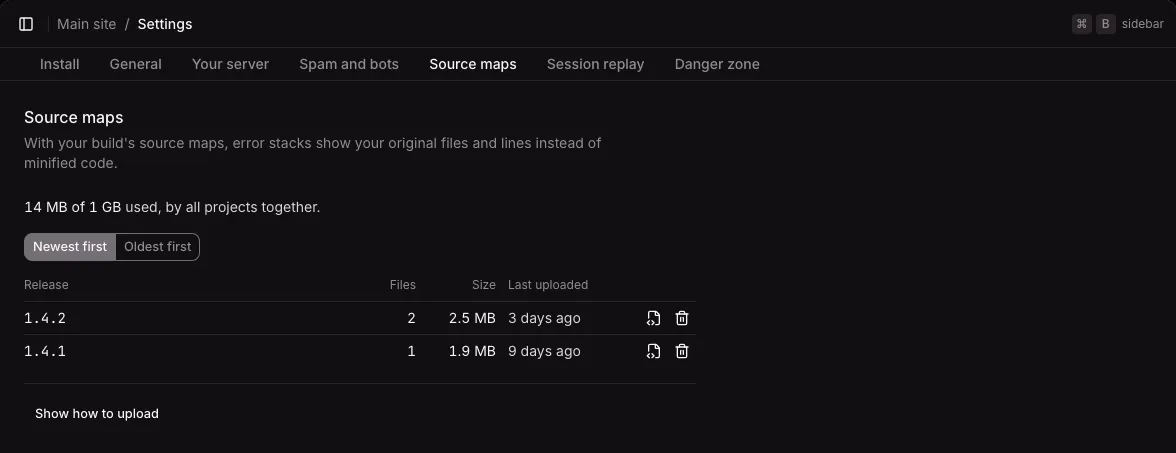
Deleting asks first. The release’s maps are deleted for good. The errors stay, and the stacks of that release show minified code again, until you upload its maps again.
How long maps stay
Section titled “How long maps stay”Maps stay until someone deletes them on the Source maps tab. Their age and the project’s event retention do not remove them, because an old release can still run in browsers. When the instance runs out of room for maps, choose Oldest first and delete the releases that no longer run. Deleting a project deletes its maps.
Maps are in the instance’s backups, with the rest of the object store. If a restore leaves the object store out, the maps are listed but cannot be read: upload the maps of the releases still in use again. See Backups.
What Ottertrail maps
Section titled “What Ottertrail maps”- Only the latest occurrence of a group is mapped. Its stack shows on the error’s page, with a line that says which release’s maps were used, or why the stack could not be mapped. See Resolving errors.
- A frame matches a map when the path of the frame’s URL is the map’s
path. - Frames that no map covers, such as another site’s script, stay as the browser reported them.
- Server stacks are never mapped.
- Maps do not change how errors are grouped. See How errors are grouped.