Funnels
A funnel counts how many people go through a series of steps in order, such as viewing the pricing page, then signing up, then paying, and where the others stop. Open Product analytics in a project’s menu, then the Funnel tab.
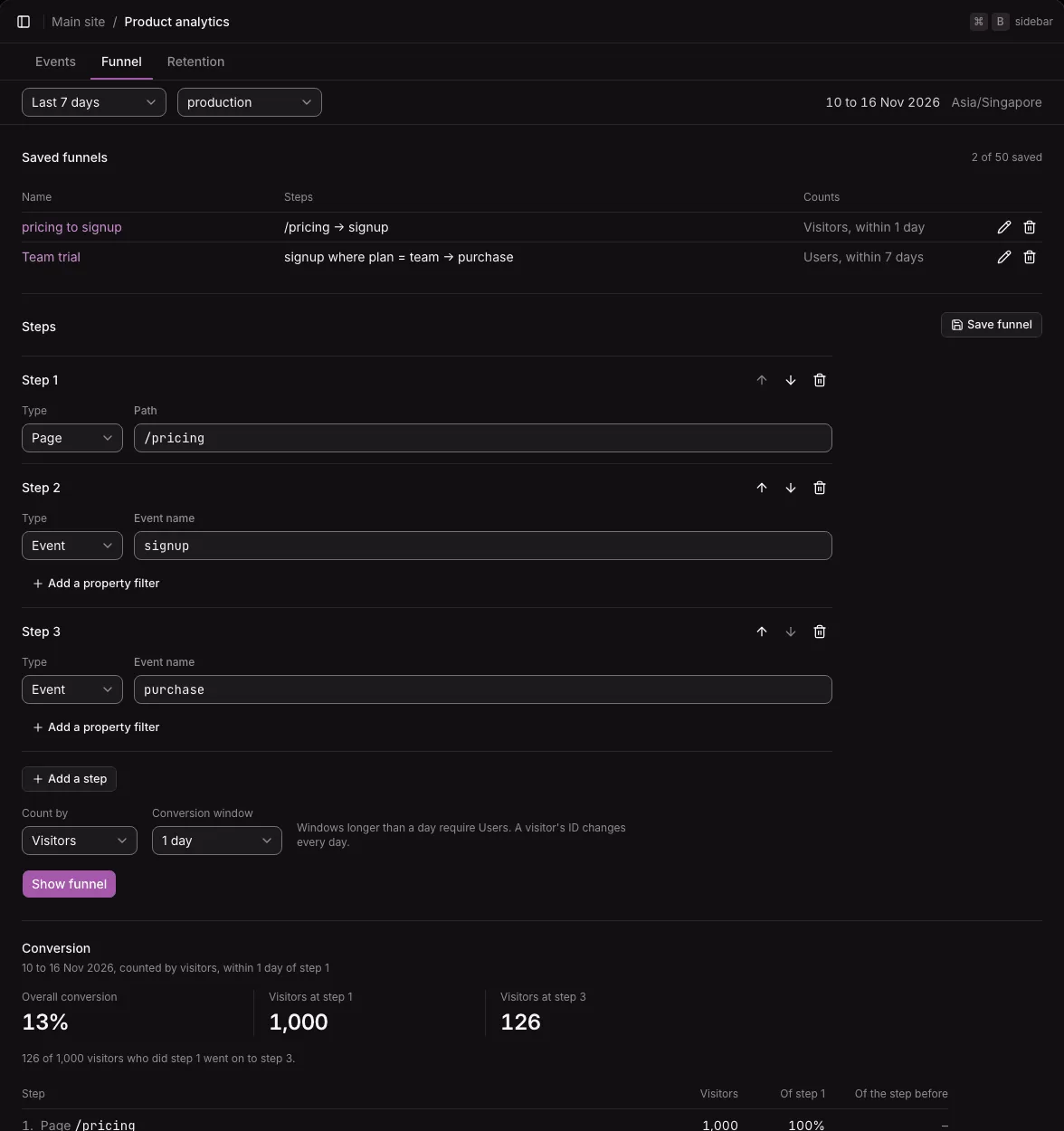
Define the steps
Section titled “Define the steps”A funnel has two to five steps. Each step is one of:
- Page: a pageview of exactly this path, such as
/pricing, without its query or fragment. - Event: a custom event of this name, typed or picked from the project’s events. Add a property filter narrows it to the events where one property has one value, such as
plan=team. See Custom events for how values are compared.
- Set step 1 and step 2. Until two steps are set, the tab offers an example made from the project’s own events (“Use this example”).
- Select Add a step for more, up to five. The arrow buttons beside a step move it up or down, and its delete button removes it.
- Select Show funnel. The fields are checked first, and a field with a problem is marked.
Two steps in a row must not be able to match the same event: the same page twice, or the same event name twice, unless both filter one property by different values. One event would count for both steps, so such a funnel always converts. Put another step between them, such as a page.
The steps go in the page’s address, so a link shows exactly the funnel you viewed.
Who is counted, and for how long
Section titled “Who is counted, and for how long”Two choices under the steps apply at once:
- Count by: Visitors (the default) or Users.
- Visitors are daily visitor IDs. A visitor’s ID changes every day, so a visitor can be followed for at most one day.
- Users are your app’s IDs for signed-in users. Only events sent while someone was signed in count, including server-side events. A user can be followed for up to 30 days.
- Conversion window: 5 minutes, 30 minutes, 1 hour, 1 day (the default), and, for users only, 7, 14, or 30 days. Windows longer than a day are disabled while you count visitors.
How conversion is counted
Section titled “How conversion is counted”- Someone reaches a step after doing all the steps before it, in order. Other events between the steps are allowed.
- Every step must happen within the conversion window, counted from that person’s step 1.
- Step 1 must happen in the period. Later steps may happen after the period ends, within the window.
- A person counts once, at the furthest step they reached.
- The funnel counts one environment,
productionunless you choose another.
The result, under Conversion, shows the overall conversion (who did the last step, as a share of who did step 1), the people at step 1 and at the last step, and then each step: its count, its share of step 1 (“Of step 1”), and its share of the step before (“Of the step before”), as bars with the numbers written out.
Saved funnels
Section titled “Saved funnels”Save a funnel to open it again later. The Saved funnels table, above the steps, lists the project’s saved funnels by name, each with its steps and who it counts for how long (such as “Visitors, within 1 day”). A project can save up to 50 funnels.
- Save funnel saves the funnel shown, under a name that you type. Select Show funnel first: Save funnel acts on the funnel shown, not on steps you have not shown yet.
- Select a saved funnel’s name to show it, in the page’s current period and environment. A saved funnel holds its steps, who it counts, and its window. It does not hold the period or the environment.
- When you change the funnel shown, the tab says that it differs from the saved one. Save changes saves over it, and Save as new funnel saves a copy under a new name.
- A saved funnel’s pencil button renames it. Its delete button deletes it, after a confirmation. Only the definition goes: the events stay.
Save changes stays disabled while there is nothing new to save, as in the save rule. If someone changed the same funnel since you opened it, for example in another tab, your change is refused, and the tab loads the saved version again, so neither change is lost without a word.
A saved funnel stores no data of its own. A funnel saved today also counts past events, and deleting one loses only its definition.
To save, rename, and delete funnels, a member needs to manage the product analytics area. To view funnels, view is enough.
Not available yet
Section titled “Not available yet”- The time between steps, and who dropped off at each step.
- Suggested property names in the step editor.