Turn on session replay
Session replay is off by default. Two switches turn it on, and both are needed:
- The project’s setting, in the dashboard: Around errors.
- The script tag, on your site’s pages:
data-replay="errors".
The script tag needs its own switch because a public key never reads a project’s settings. So the privacy options of a recording are your site’s choice, made in its own HTML.
Before you start
Section titled “Before you start”- The instance needs an object store. Without one, replays are off on the whole instance, and the Session replay tab says that the operator turns them on with
OBJECT_STORE_URL. See Object storage. - Only the owner and admins can change project settings.
1. Choose Around errors
Section titled “1. Choose Around errors”-
Open the project’s Settings, and choose the Session replay tab.
-
Under Record replays, choose one:
Choice Does Off The default. Nothing is recorded. Ottertrail refuses any recording a page sends. Around errors Each page keeps its last 30 to 60 seconds in memory, and sends the recording only when an error occurs. -
Select Save changes.
The choice follows the save rule: Save changes stays disabled until you change the choice, and “Unsaved changes” and Discard show until you save. See The save rule.
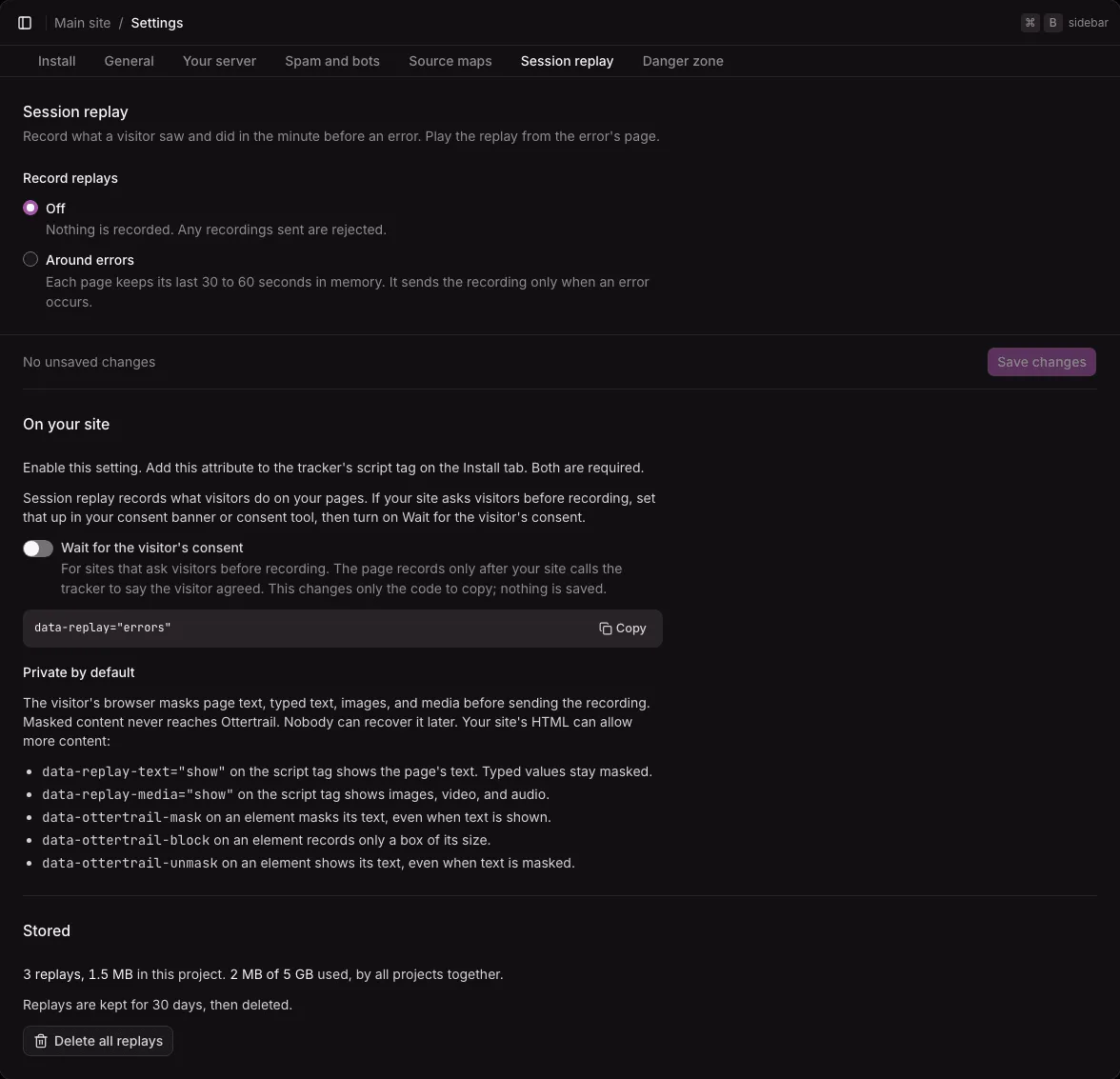
While the setting is Off, a page that sends a recording is refused, and its recorder stops for the rest of the page load.
2. Add data-replay to the script tag
Section titled “2. Add data-replay to the script tag”Under On your site, the tab shows the attribute to copy. Add it to the tracker’s script tag on every page you want to record:
<script defer src="https://analytics.example.com/t.js" data-key="pk_…" data-host="https://analytics.example.com" data-replay="errors"></script>With data-replay="errors", the tracker loads the recorder, r.js, from beside its own address. Pages without the attribute never download it.
- If the script tag has an
integrityattribute, the tracker does not load the recorder, and records no replays. - If the script tag has a
nonce, the tracker gives the same nonce to the recorder, for a strict Content Security Policy.
The tab also lists the privacy options that your site can add. See Masking and privacy.
Consent
Section titled “Consent”Ottertrail does not ask the visitor, and it has no consent banner of its own. If your site asks visitors before recording, set that up in your consent banner or consent tool, and have the tracker wait for it.
-
Turn on Wait for the visitor’s consent on the Session replay tab. The code to copy gets one more attribute,
data-replay-consent="wait", besidedata-replay="errors". The switch only changes the code to copy; nothing is saved. -
With that attribute, the tracker counts pageviews, errors, and Web Vitals as usual, but loads no recorder.
-
When the visitor agrees, call this from your banner, or from your consent tool’s “consent given” callback:
window.ottertrail.replay(true);When the visitor declines or withdraws, call
window.ottertrail.replay(false). It stops recording and drops what the page recorded. A replay already sent stays sent.
The last call wins: a visitor who declines and later agrees is recorded from their “yes”, and calling replay(true) twice is harmless. Ottertrail stores nothing on the visitor’s device, so your consent tool remembers the answer, and your site calls replay(true) again on every page load once the answer is known.
The tracker loads after the page. If your banner or consent tool may answer before then, add this script before the tracker’s tag and your consent tool’s. It keeps the answer until the tracker runs, and its other calls do nothing until then:
<script> window.ottertrail = window.ottertrail || (function () { var q = []; function noop() {} return { q: q, replay: function (on) { q.push(on); }, track: noop, identify: noop, reset: noop, captureError: noop, }; })();</script>With a consent tool, put session replay in its category for statistics or analytics, or in a category of its own. Call replay(true) from the tool’s “consent given” callback for that category, and replay(false) from its “declined” or “withdrawn” callback. How each tool names its callbacks is in its own documentation.
What to tell visitors is in Masking and privacy.
Keep personal data out of paths
Section titled “Keep personal data out of paths”Ottertrail drops query strings and fragments, but keeps each path whole. The Replays page lists and searches the paths that a replay visited. So keep personal data out of your paths, such as an email address or a reset token in /users/ada@example.com/reset/tok_….
Stored replays
Section titled “Stored replays”Under Stored, the tab shows:
- How many replays the project has, and their size.
- How much of the instance’s room for replays is used, by all projects together.
- That replays are kept for 30 days, then deleted.
Delete all replays shows while the project has at least one replay. It asks first, and says that the replays are deleted for good and the errors stay, without their replays. It is not part of the form: it acts when you confirm.
Turning replays off
Section titled “Turning replays off”Choose Off and save. Ottertrail then refuses the recordings that pages send, and each refused recorder stops for the rest of its page load. The replays already recorded stay until they expire, 30 days after they were recorded. To delete them now, use Delete all replays.
Deleting the project deletes its replays too.