Notification channels
A notification channel is where alerts go: a list of email addresses, or a webhook URL. Channels belong to the instance, so every project’s alert rules can use them, and each rule picks one or more.
Channels are in the instance’s Settings, on the Notification channels tab. The owner and admins manage them. Members see only the channels’ names, when they choose a rule’s channels (Members and roles).
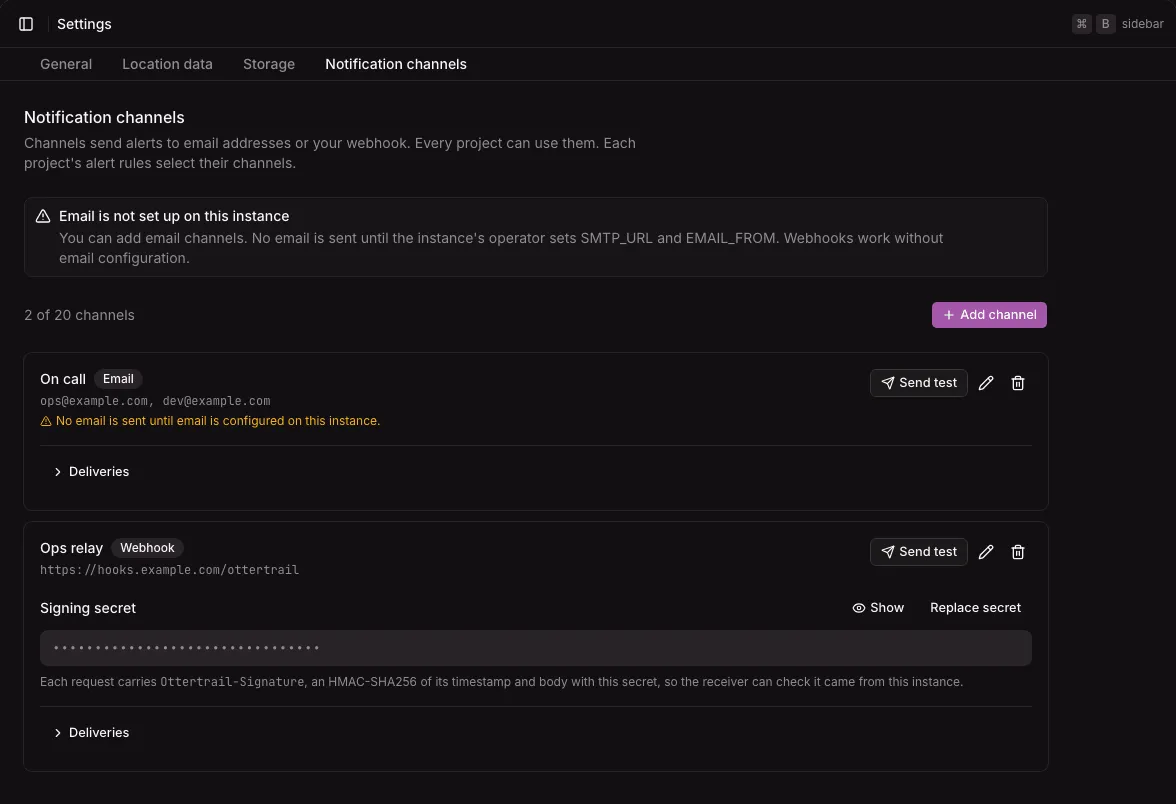
The tab lists the channels, with how many there are of the 20 allowed and Add channel. Each channel shows its name, its kind (Email or Webhook), and its addresses or URL, with Send test, Edit, and Delete buttons.
This tab has no Save bar: adding, editing, deleting, a test send, and replacing a secret are dialogs and actions that act when you confirm them.
Add a channel
Section titled “Add a channel”- Open Settings, then the Notification channels tab.
- Select Add channel.
- Choose the Kind: Email or Webhook. The kind cannot change later.
- For email, enter the Addresses, one per line or separated by commas, 1 to 20. For a webhook, enter the URL.
- Under Name, enter what alert rules call it. It takes the first address or the URL’s host when left empty.
- Select Add channel in the dialog.
Editing a channel uses the same form, with Save changes. Delete asks first, then stops notifications to the channel and deletes its deliveries. A rule left without channels is turned off, and its page says why.
Email channels
Section titled “Email channels”Email goes through the SMTP server the instance’s operator sets up, with SMTP_URL and EMAIL_FROM (Configuration).
- When the instance has one, the tab shows Email set up.
- Without one, the tab says that email is not set up on this instance. You can still add email channels, but nothing is sent to them until the operator sets up email, and their deliveries fail with that reason. Each email channel repeats the warning under its addresses.
An email channel sends one plain-text message to all its addresses at once, so its recipients see each other’s addresses. The message says what happened, when, in which project, with a link to the page in the dashboard.
Webhook channels and their secrets
Section titled “Webhook channels and their secrets”A webhook channel sends each alert as a JSON POST to its URL, signed with the channel’s secret. See Verify webhook signatures and Webhook payloads.
- The instance makes the secret when you add the channel: 43 characters.
- Under Signing secret, Show fetches and shows the secret, with a button to copy it. Hide hides it again.
- Replace secret asks first, then makes a new secret and shows it. The old secret stops working at once, so a receiver that checks signatures refuses requests until it has the new one.
A webhook URL is http or https, without a user name or password. It follows the uptime checks’ address rules: a host that resolves to a private or other internal address is refused when you save the channel, and again on every delivery. See Uptime checks.
Send test
Section titled “Send test”Send test queues a test notification to the channel, says it was queued, and opens its deliveries. Each channel takes at most 5 test sends a minute. Test sends do not count toward the channel’s hourly limit.
Deliveries
Section titled “Deliveries”Deliveries, under each channel, opens a table of its deliveries of the last 30 days, newest first, 20 at a time with Load more:
| Column | What it shows |
|---|---|
| When | When the notification was made, in the instance’s timezone |
| Event | What it was about, such as Check down or Test |
| Status | Queued, Sending, Retrying, Sent, or Failed |
| Attempts | How many times it was tried |
| What happened | When it was sent, or the last error, and for a retry when it is tried next |
While a delivery is queued or retrying, the table is read again every 5 seconds.
A failed delivery is tried again after 30 seconds, then after 1, 2, 5, 10, 20, and 20 minutes: eight attempts in about an hour. Then it fails for good with its last error. A webhook counts as delivered when it answers with a 2xx status within 10 seconds.
Limits
Section titled “Limits”- At most 20 channels per instance, and 20 addresses per email channel.
- Each channel takes at most 60 deliveries an hour. Past that, notifications to it are recorded as failed and not sent. Each alert rule also sends at most 20 notifications an hour.
- Deliveries are kept 30 days.
- Not available yet: Slack and Discord messages in their own formats (a webhook can reach a small relay), SMS, and phone calls.