Spam and bots
A project’s public key is in every page of your site, so anyone can copy it and send events. Some events arrive that no person caused: crawlers, scripts, test runs, and referrer spam (visits that exist only to put a site’s name in your list of sources). Ottertrail keeps most of them out of your numbers, and lets you delete what got in.
What is ignored
Section titled “What is ignored”Ottertrail answers most caught events as if they were stored (202), so a sender has no reason to send them again. Those events are not stored, and they do not use up the project’s event budget. The limit on events per client address is the exception: it answers 429 with a time to wait, and the tracker sends the events again then. Ottertrail stores nothing about the sender.
| Measure | What it catches | Can you change it? |
|---|---|---|
| Bots | Browsers that say they are automated in their User-Agent: search engine crawlers, link previews, monitoring tools, headless browsers, and HTTP libraries such as curl. A request without a User-Agent counts as a bot too. |
No |
| Data centers | Browser events from the addresses of cloud and hosting providers (below). | Yes: “Ignore visits from data centers” |
| Blocked addresses | Browser events from addresses and ranges that you list, such as your office’s. | Yes: “Blocked addresses” |
| Referrer spam | Visits whose referrer is a known spam domain, or a domain that you list. | Your own list: “Blocked referrers” |
| Events per client address | A client that sends events as fast as it can is held at 20 events a second, after a burst of 200. | No |
| A daily cap per visitor | After one visitor has sent 5,000 events in a day, the rest of that day’s events are not stored. A person sends a few dozen to a few hundred. | No |
None of these applies to server-side events. They come from your own server.
Data centers
Section titled “Data centers”People browse from homes, offices, and phones. Scrapers, headless browsers, and test runs run on servers rented from a cloud or hosting provider, often with the User-Agent of an ordinary browser. So a browser event from such an address is ignored like a bot. The address is checked when the event arrives and never stored.
The list holds the published ranges of Amazon Web Services, Google Cloud, Microsoft Azure, Oracle Cloud, DigitalOcean, Akamai Cloud (Linode), and Vultr, and the networks of Hetzner, OVHcloud, Scaleway, Contabo, Alibaba Cloud, Tencent Cloud, and Huawei Cloud. While automatic location data updates are on (the default), your instance downloads the ranges again every week. See Location data.
Privacy relays, such as iCloud Private Relay, and CDNs, such as Cloudflare and Fastly, are not on the list.
Referrer spam
Section titled “Referrer spam”A browser batch with an event whose referrer is a listed domain, or a subdomain of one, is not stored. The whole batch goes, because its other events (time on the page, Web Vitals) belong to the same spam visit. A listed semalt.com catches www.semalt.com, but not notsemalt.com.
The domains come from three lists:
- A community list of known referrer spam domains, which ships with each Ottertrail release. Your instance never downloads it.
- A short list of Ottertrail’s own additions, which also ships with each release.
- The project’s own “Blocked referrers”.
A referrer on one of the project’s own allowed sites is never spam, whatever a list holds.
The Spam and bots tab
Section titled “The Spam and bots tab”Open the project’s Settings, then the Spam and bots tab. The owner and admins can see and change it. Members cannot. The tab has a form with three settings, and “Delete spam” below it.
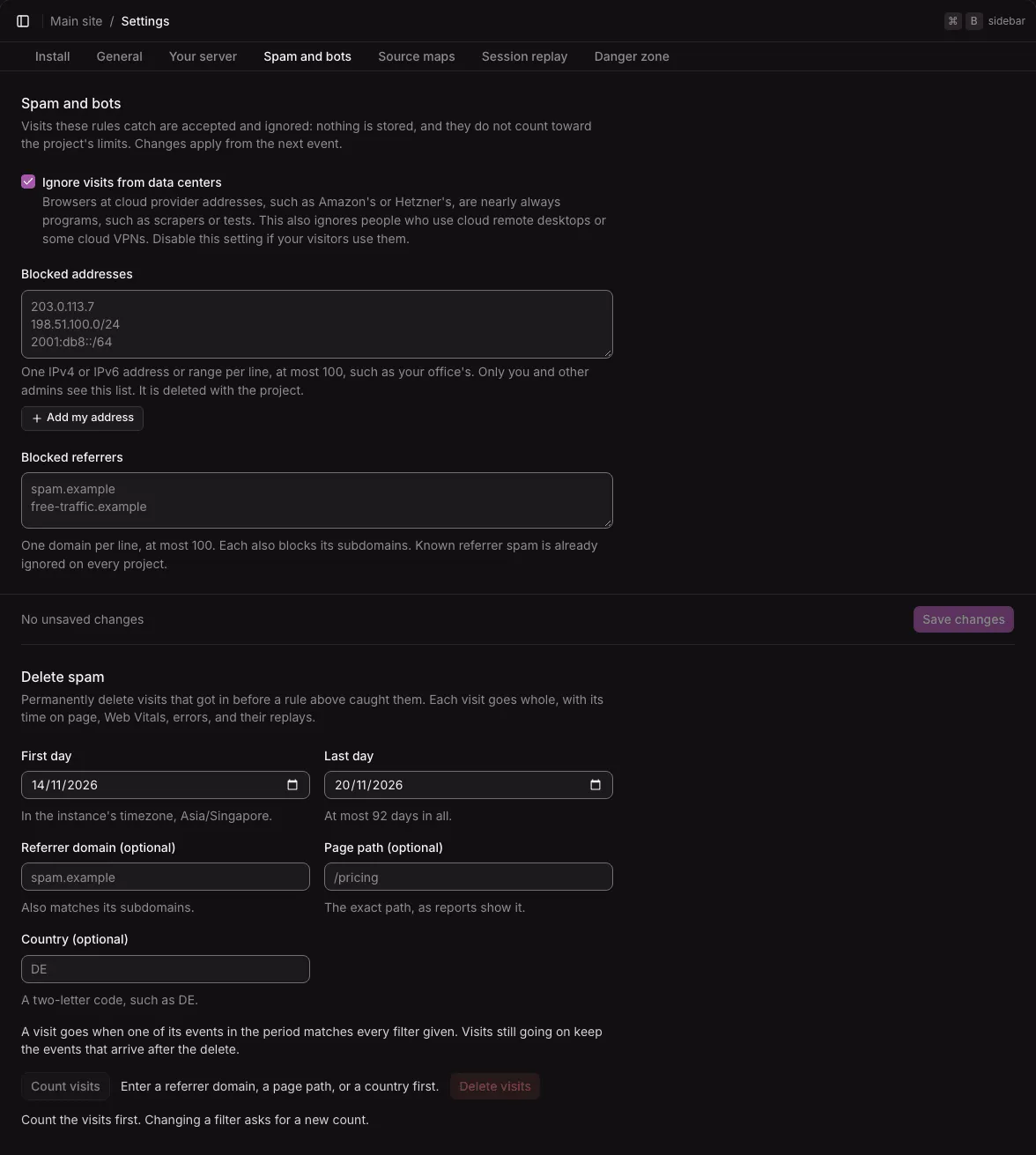
The form follows the save rule: “Save changes” stays disabled until you change something, and it saves all three settings together. A change applies from the next event.
Ignore visits from data centers
Section titled “Ignore visits from data centers”On by default. Turn it off if your visitors browse from a cloud: remote desktops such as Amazon WorkSpaces or Windows 365, some VPNs, and corporate proxies that run at these providers. With it off, bots that run in data centers count too.
Blocked addresses
Section titled “Blocked addresses”One IPv4 or IPv6 address or range per line, at most 100, such as 203.0.113.7, 198.51.100.0/24, or 2001:db8::/48.
- A range can be at most a
/8of IPv4 or a/16of IPv6. A wider range would block a large part of the internet by one wrong digit. - Ranges written as
start-end, and addresses with a zone (fe80::1%eth0), are refused. - Add my address adds the address that your instance sees your browser come from. For an IPv6 address it adds its
/64, since the same browser may use another address of that block tomorrow. If the address is already listed, it says so. Save to apply it.
These are the only IP addresses that Ottertrail stores, and only because you typed them. Only the owner and admins see the list, it is never stored with events, and it is deleted with the project.
Blocked addresses also drop session replay uploads from those addresses. Server-side events are never blocked.
Blocked referrers
Section titled “Blocked referrers”One domain per line, at most 100. Each also blocks its subdomains. Known referrer spam is already ignored on every project, so list only what gets past it.
- Write the domain without a scheme, a path, or a port. Ottertrail stores it in lower case, and internationalized names in their ASCII form.
- A domain needs at least two labels. A common public suffix, such as
co.uk, is refused, because it would block every site under it. - The project’s own sites, or a parent of one, are refused: the field says the entry “would block your own site”.
- IP addresses are refused.
Both lists are checked as you type, once you leave the field or try to save. A wrong line is named under the field, and Save sends nothing while one is wrong.
Delete spam
Section titled “Delete spam”The rules above work from the next event. Spam that came before a rule, or that no rule catches, can be deleted afterwards, as whole visits. Deleting spam is permanent. It is outside the save rule: nothing is deleted until you confirm.
- Choose the First day and Last day. The days are in the instance’s timezone, and the last week is chosen at first. The period can cover at most 92 days, cannot end after today, and cannot start before the project’s retention keeps events.
- Enter at least one filter: Referrer domain (it also matches its subdomains), Page path (the exact path, as reports show it), or Country (a two-letter code, such as
DE). Each filter you enter must match. “Count visits” stays disabled until you enter one, because without a filter every visit of the period would go. - Select Count visits. The tab says what a delete would take, for example: “12 visits match, with 40 events: 20 pageviews, 3 custom events, 2 errors, and 15 other events (time on page, Web Vitals). 1 session replay goes with them.”
- Select Delete visits. It stays disabled until there is a count of the filters as they are now: change a filter, and you count again.
- The dialog names the counts and asks you to type the number of visits. Type it, then select Delete permanently.
Afterwards the tab says how many visits and events were deleted, and the reports no longer count them.
What is deleted
Section titled “What is deleted”- A visit goes when one of its events in the period matches every filter given.
- The whole visit goes: its pageviews, custom events, errors, time on page, Web Vitals, and the session replays of its errors. Events of such a visit that fall just outside the period go too.
- Server-side events belong to no visit and are never deleted here.
- A visit still going on keeps the events that arrive after the delete. When the period ends today, the tab says so. Delete again later to take the rest.
A delete takes at most 10,000 visits. When more match, the tab asks for a shorter period or narrower filters, so that you delete in parts. If the visits found no longer match the number you typed, nothing is deleted, and you count again. If a delete stops partway, the dialog shows the message: count again, then delete what is left.
Deleted events can stay in backups until those backups are deleted.
Testing your own site
Section titled “Testing your own site”Some ways of testing send events that Ottertrail ignores:
curland HTTP libraries announce themselves in the User-Agent, so their events count as bots. To send a test event withcurl, pass a browser’s User-Agent with-A "Mozilla/5.0 …".- Headless browsers say
HeadlessChromein their User-Agent. Give automated browser tests a normal User-Agent. - Tests in CI usually run in a data center. GitHub Actions runners, for example, run in Azure. Tests that should count need a project with “Ignore visits from data centers” off. Use a separate project for them, or
data-environment, so they stay out of the live numbers. - Your own address in “Blocked addresses” blocks your own tests too.
Visits that the filters drop
Section titled “Visits that the filters drop”The measures also drop some visits that people made:
- People in a cloud: remote desktops, some VPNs, and corporate proxies at the listed providers. Turn off “Ignore visits from data centers” if your visitors browse that way.
- Behind a proxy without
TRUST_PROXY, every request seems to come from the proxy’s address, which may be in a cloud. Then every event is ignored. See Configuration. - A site that forwards its events through its own server sends them all from that server’s address, which is usually in a cloud. Such forwarding is not supported: every visitor would share the server’s address, location, and visitor ID.
- Many people behind one address, such as an office, a school, or a mobile carrier’s shared address, share one limit of events per client address. On a busy site their events wait and are sent again. A short peak loses nothing, but a long one can.
- A blocked referrer catches only the first page. A spam visit’s later pages carry your own pages as referrers, so a bot that browses on leaves those pages behind. Delete them with “Delete spam”.
- The lists know only the domains someone reported, and bots on home connections, or at providers not listed, still count.
Not available yet
Section titled “Not available yet”- A count of the caught bots and spam for each project over time.
- Recognizing bots that pretend to be browsers from home connections or unlisted providers.
- A limit of events per client address set for each project, for sites whose visitors share an address.