Web Vitals
The tracker measures how fast each page load felt in your visitors’ browsers. The Speed page, in a project’s menu, shows the results. You need nothing beyond the tracker’s snippet.
What is measured
Section titled “What is measured”| Metric | What it measures | Good up to | Poor above |
|---|---|---|---|
| Largest Contentful Paint (LCP) | When the main content appeared | 2.5 s | 4 s |
| Interaction to Next Paint (INP) | How quickly the page responded to clicks, taps, and key presses | 200 ms | 500 ms |
| Cumulative Layout Shift (CLS) | How much the content moved while loading | 0.1 | 0.25 |
| First Contentful Paint (FCP) | When the first text or image appeared | 1.8 s | 3 s |
| Time to First Byte (TTFB) | When the server’s response started to arrive | 0.8 s | 1.8 s |
LCP, INP, and CLS are the Core Web Vitals. FCP and TTFB help explain LCP: the main content cannot appear before the server responds and the browser starts to display the page. The thresholds are Google’s. A value between “good” and “poor” needs improvement.
The tracker sends one measurement for each page load, when the page is first hidden or left. A value not measured by then is left out: INP when the visitor did not interact, LCP when the page was hidden before its main content showed. A page that the browser restores from its back/forward cache is a new page load with its own values.
The Speed page
Section titled “The Speed page”The Speed page is a report: the filter bar, then the figures, a chart, and two tables. See Reports for the parts all reports share. To see it, a member needs the web analytics area.
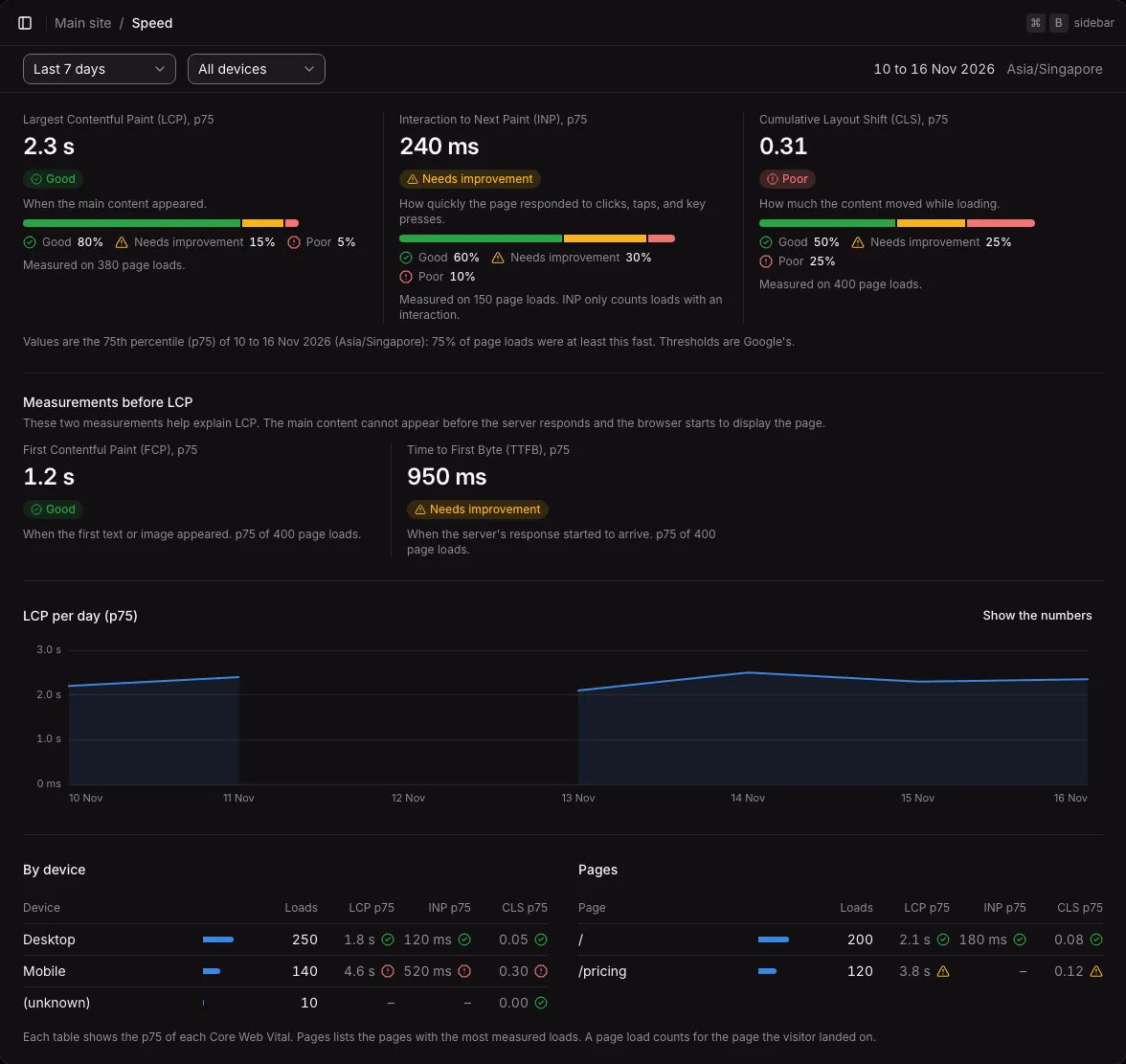
- The filter bar: the period, the environment once there is a choice, and the device: All devices, Desktop, Mobile, or Tablet.
- The Core Web Vitals: LCP, INP, and CLS, each at the 75th percentile (p75), with its rating (Good, Needs improvement, or Poor), a bar of the shares of good, needs improvement, and poor page loads, and how many page loads were measured. INP counts only page loads with an interaction.
- Measurements before LCP: FCP and TTFB at the 75th percentile, with their ratings.
- LCP per day (p75): a chart with a gap for each day without page loads. “Show the numbers” opens a table of every day.
- By device and Pages (the 20 pages with the most measured loads): each row has its loads and the p75 of LCP, INP, and CLS, each with a rating icon. A page load counts for the page the visitor landed on.
The 75th percentile
Section titled “The 75th percentile”The p75 is the value that 75% of page loads were at least as fast as. It shows what most visitors felt, without one very slow load pulling it up. A rating is of the value as shown, so “2.5 s” is never rated as over 2.5 seconds. The shares in a bar are rounded one by one, so the three can add up to 99% or 101%.
Single-page apps
Section titled “Single-page apps”The values belong to the page load, not to each page that a single-page app shows without a page load. The values count for the page the visitor landed on. Its INP and CLS include clicks and shifts on later pages of the app, until the page is first hidden. An early redirect, such as from / to /en/, does not lose the measurement.
When the Web Vitals script does not load
Section titled “When the Web Vitals script does not load”The tracker loads a second script, v.js, from beside its own address to measure Web Vitals. The Speed page stays empty when it does not load:
- A pinned tracker: if the script tag has an
integrityattribute, the tracker does not loadv.js, becausev.jscannot be pinned with it. - A strict Content Security Policy: the tracker gives
v.jsthe script tag’snonce. A page that requires Trusted Types refusesv.js. Turn Web Vitals off there.
Without page loads, the Speed page explains these cases itself.
Turning Web Vitals off
Section titled “Turning Web Vitals off”Add data-vitals="off" to the script tag. The tracker then does not download v.js, and sends no Web Vitals:
<script defer src="https://analytics.example.com/t.js" data-key="pk_…" data-host="https://analytics.example.com" data-vitals="off"></script>Web Vitals are not web analytics: they make no visit, pageview, or custom event, and they are not part of a user’s activity. vitals is a reserved event name: track("vitals") is refused.
Not available yet
Section titled “Not available yet”- A comparison with the period before, as the Web analytics page has.
- FCP and TTFB by device and by page.
- Values of their own for the pages that a single-page app shows without a page load.