Masking and privacy
A recording holds whatever is on the screen. So the recorder starts from privacy: nothing a visitor reads or types leaves their browser unless you chose to show it.
The rules
Section titled “The rules”- Off until you turn it on, in the project’s settings and on the script tag. See Turn on session replay.
- Masked in the browser. The visitor’s browser masks the recording before it keeps it in memory or sends it. Ottertrail never receives what was masked, so nobody, on the server or in the dashboard, can unmask it later.
- Private unless you loosen it. With no options, text and typed values are masked, and images and media are blocked. Your site loosens this on purpose, in its own HTML.
- Fails closed. When the recorder cannot tell whether something should be masked, it masks it. A recording that cannot be masked as set up is not sent.
What the defaults hide
Section titled “What the defaults hide”| What | By default | Shown when |
|---|---|---|
| Text on the page | Masked: each character becomes *, with spaces kept |
The script tag has data-replay-text="show", or the element has data-ottertrail-unmask |
Text in title, placeholder, alt, aria-label, and aria-description |
Masked, as text | As text |
| Typed values: inputs, text areas, and selects | Masked | Never |
Images, <picture>, <video>, <audio>, and <svg> |
Blocked: a box of the same size | The script tag has data-replay-media="show" |
<canvas>, <iframe>, <object>, and <embed> |
Blocked | Never |
| Addresses in links, images, forms, and the page’s own URL | Origin and path only | Never. Query strings and fragments often carry tokens. |
Masked text keeps its length. So a replay still shows which button was clicked and where a form was half filled in, without what it said.
This example was recorded with the page’s text shown (data-replay-text="show"), so its labels are readable. The typed values and the cart lines are still masked. With the defaults, every character of the page’s text is an asterisk too.
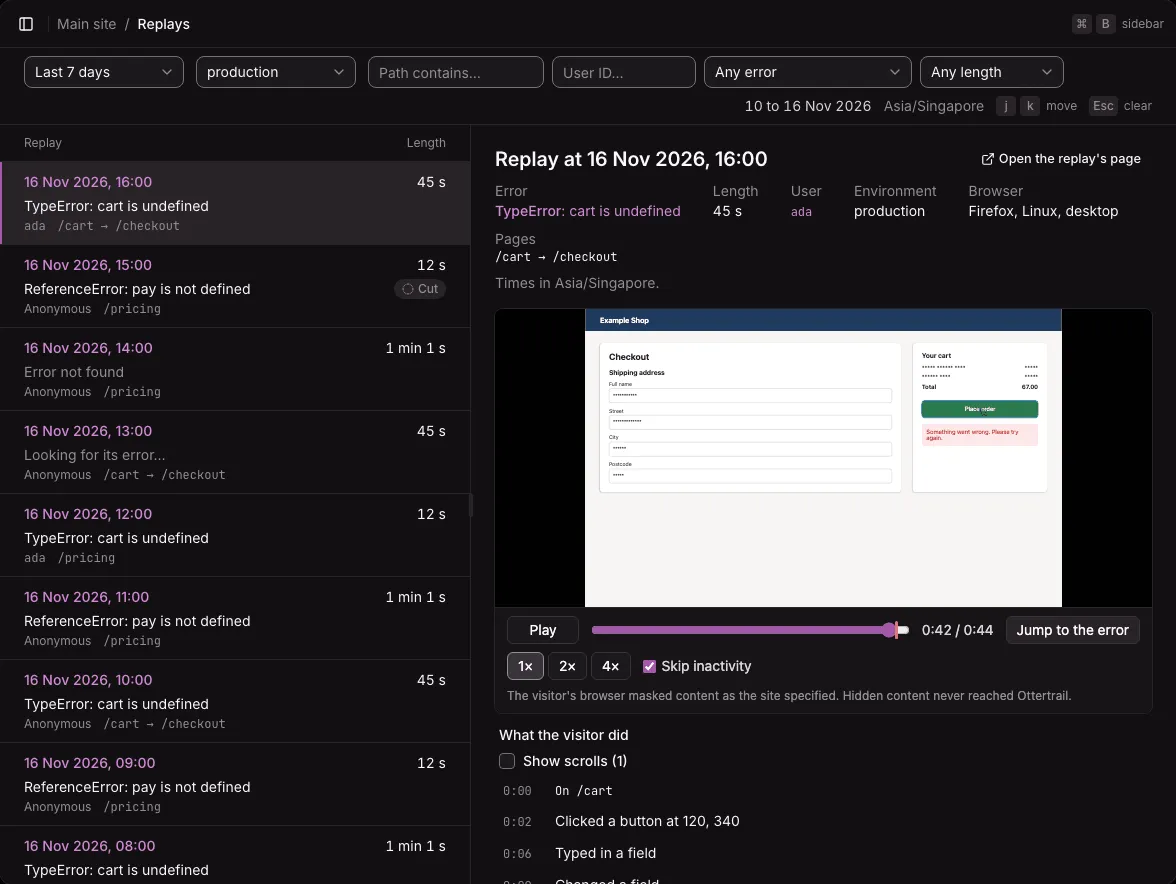
The recorder is stricter than the table in a few places:
- The text of
<option>elements and of editable regions counts as typed, so it stays masked even when the script tag shows text. data-*attributes and other attributes the recorder does not know are masked as text, unless text is shown. A stylesheet that selects on them can then look a little off in a private replay.<meta>content is masked.
Show text or media on purpose
Section titled “Show text or media on purpose”Add these to the tracker’s script tag:
| Attribute | Shows |
|---|---|
data-replay-text="show" |
The page’s text. Typed values stay masked. |
data-replay-media="show" |
Images, video, and audio. Canvas, frames, <object>, and <embed> stay blocked. |
Show text only when your pages hold no personal data, or mark the parts that do (below).
Markers in your HTML
Section titled “Markers in your HTML”Put these attributes on elements in your own HTML:
| Marker | Does | For example |
|---|---|---|
data-ottertrail-mask |
Masks the element’s text, even when the script tag shows text. | The name and email on an account page, in a site that otherwise shows text. |
data-ottertrail-block |
Leaves the element out. The replay shows a box of its size. | A payment form, a chat window, a document preview. |
data-ottertrail-unmask |
Shows the element’s text, even when the rest of the page is masked. | The menu and headings of a site that keeps text masked. |
<nav data-ottertrail-unmask>…</nav><section data-ottertrail-mask> <p>Ada Lovelace, ada@example.com</p></section><form data-ottertrail-block>…</form>- A marker applies to the element and everything inside it.
- The stricter marker wins: block, then mask, then unmask.
data-ottertrail-unmaskinside a masked or blocked element does nothing. data-ottertrail-unmasknever shows typed values.- A block marker added after the page loaded cannot take back what was already recorded inside the element. New content there is left out at once. What was there before leaves the replay with the next full copy of the page, at most 30 seconds later. Put block markers in your HTML from the start.
- With heatmaps on,
data-ottertrail-maskanddata-ottertrail-blockalso keep clicks inside the element out of heatmaps.data-ottertrail-unmaskhas no effect on heatmaps.
Never recorded
Section titled “Never recorded”Whatever the options and markers:
- Typed values, password fields included.
- Scripts. The recorder records no script contents, and the player runs none.
- Network requests and responses, console output, cookies, and storage.
- Query strings and fragments, in the page’s address and in any link or image address.
Paths are kept whole, as in web analytics, and the Replays page lists and searches them. Keep personal data out of your paths, such as an email address in /users/ada@example.com.
Consent
Section titled “Consent”Ottertrail does not ask the visitor for consent, and it has no consent banner of its own. If your site asks visitors before recording, the tracker can wait for your consent banner or consent tool: see Turning it on.
Whether your site must ask, and what its privacy notice must say, is for you and your legal advice. It depends on the law where your site and its visitors are, and on what you record. A site that records sessions usually says so in its privacy notice, whether it asks first or not. A sample paragraph to adapt, for a site that uses the defaults:
When something goes wrong on a page, we may keep a short recording of the page as it appeared and of what you did on it, such as clicks, scrolling, and mouse movements, to find and fix the problem. Page text is hidden in the recording, and so are the characters you type, though the recording shows where and when you typed, and how many characters. With it we keep the addresses of the pages you visited (without the part after a “?” or “#”), the size of your browser window, your browser, operating system, and type of device, and the error that happened. Recordings are kept on our own analytics server for 30 days and are not used for advertising. If you are signed in, a recording is linked to your account.
Change it to match your site:
- Keep the last sentence only if your site names its signed-in users (Name signed-in users).
- With
data-replay-text="show"the page’s text is recorded, and withdata-replay-media="show"its images are. - With
data-replay-consent="wait", say that recording starts only after the visitor agrees. - “Our own analytics server” holds when you host Ottertrail yourself. If someone else hosts your instance, name them as you name your other processors.
- Replays are kept 30 days on the instance, but backups made with
backup.shhold them as long as you keep the backups. If you keep backups longer than 30 days, say so.
Who can watch replays
Section titled “Who can watch replays”Replays show real people, so they are an area of their own. The owner and admins can watch them. A member can watch them only with access to the replays area. See Members and roles.
Replays are kept 30 days, then deleted. A recording carries no user or visitor ID. Ottertrail lists a replay under a user when its error carries the user’s ID.
Not available yet
Section titled “Not available yet”- Showing typed values, even for one field.