Location data
Two files tell the instance what it knows about IP addresses:
| File | What it is for | Size |
|---|---|---|
| The location database | DB-IP’s free City Lite database. It gives each visit a country, region, and city. | About 130 MB |
| The data-center ranges | The address ranges of cloud and hosting providers. Browser events from these addresses are ignored as bots. | About 400 KB |
The instance looks up an address when an event arrives and never stores the address. A file that is out of date gives slowly more wrong answers, the city first, so the instance keeps both files current by itself.
Automatic updates
Section titled “Automatic updates”The worker downloads both files when it first starts. The API loads them within 10 minutes, without a restart. Until then, events are stored without a location, and visits from cloud servers are not recognized as bots.
After that, the worker looks every 6 hours whether a file is due:
- The location database: once a month. DB-IP publishes each month’s file on the 1st. Until it is out, the worker keeps last month’s.
- The data-center ranges: once a week.
Each new file is downloaded beside the old one and checked before it replaces it, in one step. A download that fails keeps the old file. The worker tries a missing file again after 15 minutes, then waits longer each time, up to 6 hours. A file that is in place is tried again at the next 6-hourly look, and once a day after 3 failures in a row.
The API looks for new files every 10 minutes, and checks a new file before it uses it. A file that fails the check is not used, and the old one stays.
The server must reach these addresses over HTTPS: download.db-ip.com, and the providers’ lists at ip-ranges.amazonaws.com, www.gstatic.com, www.microsoft.com, download.microsoft.com, docs.oracle.com, digitalocean.com, geoip.linode.com, and geofeed.constant.com.
The Location data tab
Section titled “The Location data tab”Open Settings from the workspace menu, then the Location data tab. Only the owner sees it.
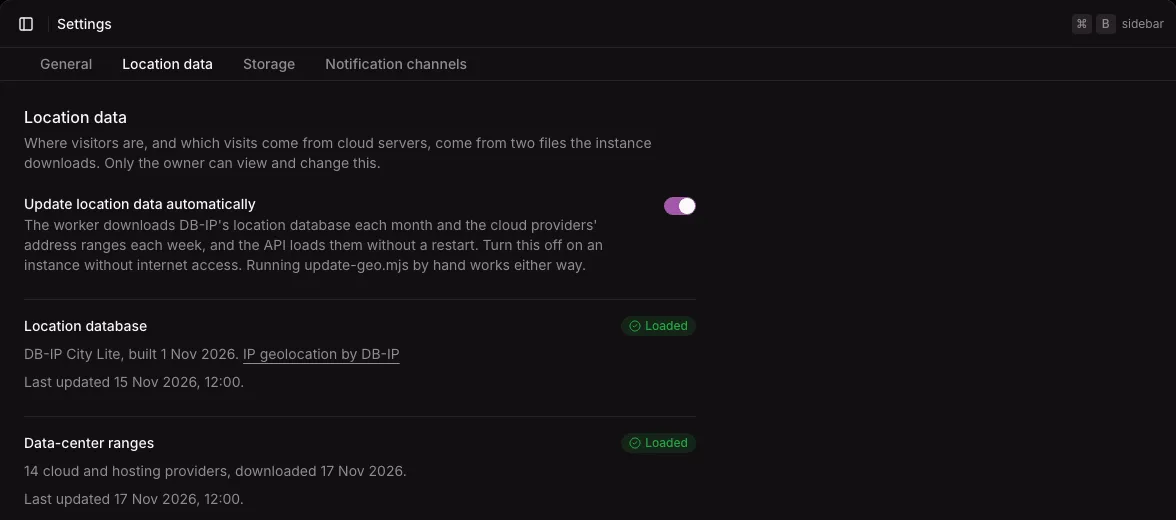
The tab shows the switch, then one part for each file:
- A badge: Loaded, Missing, Update failed, or Not loaded. With
GEO_SOURCEset tocloudflareornone, the location database shows Not needed. - What the API has loaded: DB-IP City Lite and its build date, or how many providers’ ranges, and when they were downloaded.
- The last update that succeeded, in the instance’s timezone.
The tab also says what is wrong, and what happens next:
- A missing file: what that means (no locations, or visits from cloud servers not recognized), and that the worker downloads it, or, with automatic updates off, that you run
update-geo.mjs. - A new file: within 15 minutes of a download, the tab says that the API loads it within 10 minutes. After that, Not loaded means the API did not load it. The tab gives the API’s reason, or says that the API and the worker may not share the location data folder (the
geo-datavolume). - A failed update: when it failed, that the file was kept, and the reason. With automatic updates on, the worker tries again by itself.
- Some providers failed: when the data-center file was written without some providers’ lists, the tab names them in a warning.
Turn the updates off
Section titled “Turn the updates off”Turn updates off on an instance without internet access, or when you do not want the downloads.
- On the Location data tab, turn off Update location data automatically.
- Select Save location data settings.
The tab follows the dashboard’s save rule: the button stays disabled until the switch changes, and leaving the page with the change unsaved asks first. See The save rule.
The worker then downloads nothing. The files stay as they are until someone runs update-geo.mjs. The API writes a warning to its log at start when the location database is more than 60 days old or the data-center ranges more than 45 days old.
When you turn the updates on again, the worker starts a round within a minute.
Update the files by hand
Section titled “Update the files by hand”Run this in the instance’s folder. It works with automatic updates on or off:
docker compose exec api node dist/update-geo.mjs- It downloads both files at once, whether they are due or not, and checks each before it replaces the old one.
- The API loads the new files within 10 minutes. You do not need to restart it.
- If a download fails, the old file stays, and the command exits with status 1.
- If the worker is updating at that moment, the command says so, with the time when that update ends at the latest, and exits with status 1.
- Ctrl-C stops it cleanly. The old files stay.
See Server commands.
Where locations come from
Section titled “Where locations come from”GEO_SOURCE chooses where visit locations come from:
| Value | Locations from |
|---|---|
database (default) |
The location database |
cloudflare |
The location headers that Cloudflare adds. Use it only when every request passes through Cloudflare, because any client can send these headers. |
none |
No location lookup |
With cloudflare or none, the instance does not download the location database. It still downloads the data-center ranges, because collection checks them for every project that ignores data centers.
The Compose file does not pass GEO_SOURCE from .env. It is a setting for running the image without the Compose file.
Credit
Section titled “Credit”The location database is IP geolocation by DB-IP, licensed under CC BY 4.0. The license requires this credit wherever locations are shown. The dashboard shows it on the Location data tab.
Limits
Section titled “Limits”- The files come straight from DB-IP and the providers, without a mirror. An instance that cannot reach them keeps its old files, and the tab shows the error.
- A new file affects only new events. Events that are already stored keep their location.